
Let's be honest — most guides about WhatsApp message templates feel like they were written by someone who never actually had to get one approved. They show you pretty screenshots of welcome messages, sprinkle in some marketing fluff, and call it a day.
But here's the thing: if you're building a real business on WhatsApp, pretty templates won't save you when Meta rejects your submission for the third time, or when your quality rating drops to red and your daily message limit gets slashed.
We built TalkWhy to handle customer conversations at scale — and we've learned these lessons the hard way. This guide covers what actually matters: the approval mechanics, the pricing reality, the compliance traps, and the interactive features that turn a simple message into a conversion machine.
What Are WhatsApp Message Templates, Really?
WhatsApp message templates are pre-approved message formats that businesses use to start conversations with customers who haven't messaged them first. Think of them as your "cold outreach" permission slip from Meta.
Here's the rule in plain English: if a customer hasn't sent you a message in the last 24 hours, you must use an approved template to reach out. No exceptions. No workarounds.
But templates aren't just a bureaucratic hurdle. They're what separate spam from legitimate business communication. Meta reviews every template to make sure businesses aren't flooding users with unwanted messages.
The templates you create today will be the backbone of your WhatsApp marketing, support, and sales workflows. Get them right from the start, and you'll save yourself weeks of frustration.
The Four Template Categories (And Why Picking the Wrong One Will Cost You)
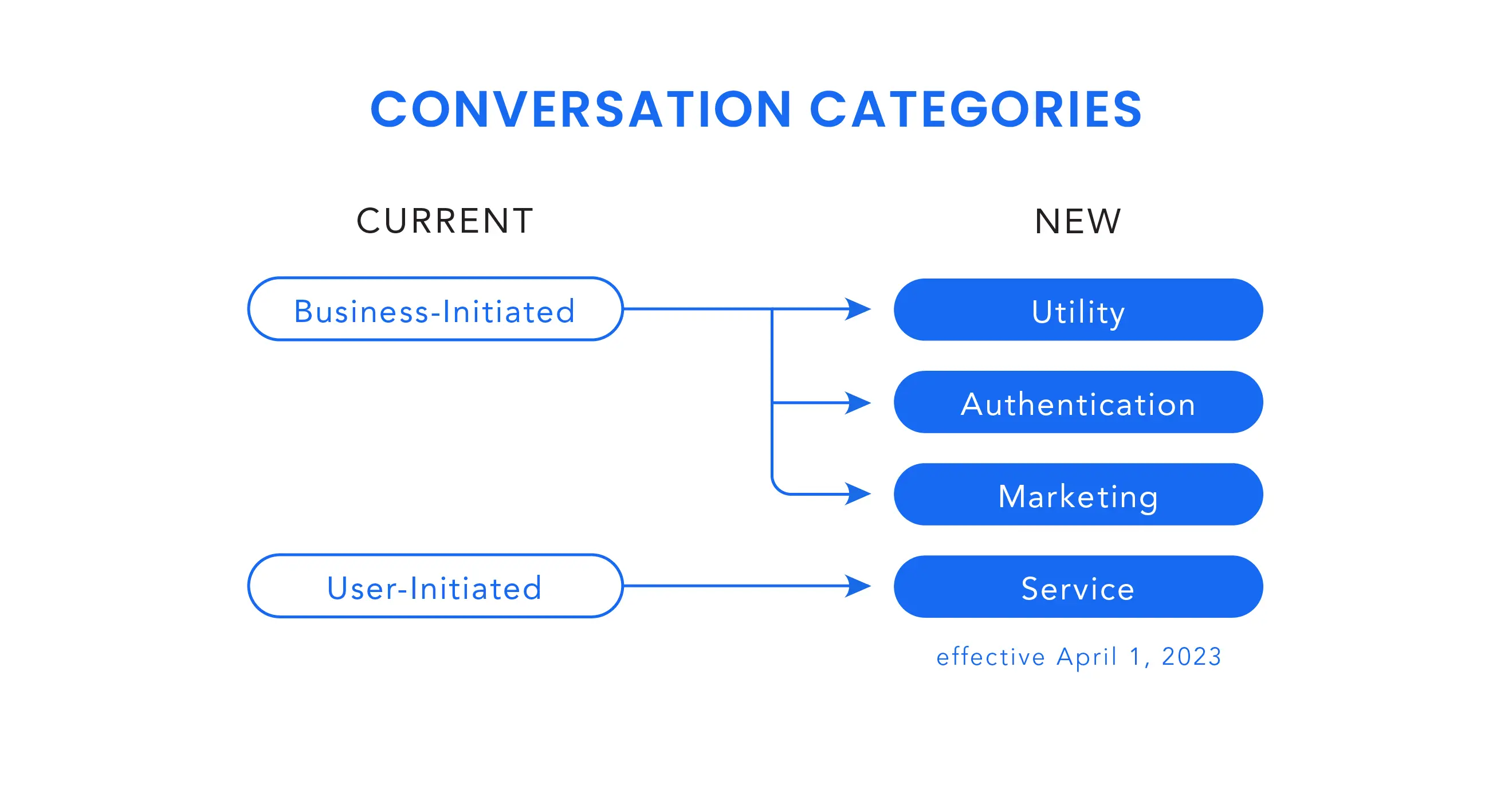
This is where most businesses stumble. Meta doesn't just have one type of template — there are four distinct categories, and each one has different rules, pricing, and approval standards.
1. Marketing Templates
These are your promotional messages: discount codes, product launches, abandoned cart reminders, seasonal campaigns. They're the most expensive category and face the strictest scrutiny.
When to use: Re-engaging inactive customers, announcing sales, promoting new collections.
Pricing reality: In the US, you're looking at roughly $0.025 per delivered message. In India, it's about ₹0.86 (~$0.010). Germany? Over $0.13 per message.
2. Utility Templates
Order confirmations, shipping updates, appointment reminders, payment receipts — anything transactional that follows a customer action. These are significantly cheaper and typically approved faster.
When to use: Post-purchase updates, booking confirmations, account notifications, delivery tracking.
Pricing reality: Around $0.004 in the US, ₹0.115 in India. Roughly 80-95% cheaper than marketing messages.
Critical trap: If you sneak promotional language into a utility template, Meta will either reject it or silently reclassify it as marketing — and bill you at the higher rate.
3. Authentication Templates
One-time passwords, login codes, verification messages. These are aggressively priced to compete with SMS OTPs.
When to use: Account verification, 2FA, password resets.
Pricing reality: Similar to utility rates in most markets. In India, about ₹0.115. But watch out for international rates — sending an OTP across borders can cost 20x more.
4. Service Messages
Free-form replies within 24 hours of a customer messaging you. No template needed, no approval required.
Important 2026 update: Service messages have been free since November 2024, but Meta announced they'll start charging for them from October 1, 2026, at utility/authentication rates.
The Anatomy of a WhatsApp Template
Every template is built from four possible components. Understanding these isn't just technical trivia — it's what separates templates that get approved from ones that get rejected.
Header (Optional)
Text: Up to 60 characters. Great for a subject line or greeting.
Image/Video/Document: Visual context that grabs attention immediately.
Location: Perfect for delivery pickups, store locations, or service calls.
Body (Required)
The main message. Up to 1,024 characters. This is where your variables go — those {{1}}, {{2}} placeholders that get replaced with real customer data.
Pro tip: Never start or end your body text with a variable. Meta rejects templates where variables aren't surrounded by explanatory text.
Footer (Optional)
Up to 60 characters of gray secondary text. Use it for disclaimers, legal info, or a subtle brand sign-off.
Buttons (Optional)
This is where the magic happens:
Quick Reply: Up to 3 buttons for instant responses (Yes/No/Maybe, Confirm/Cancel, etc.)
CTA (Call-to-Action): One button that links to a URL or initiates a phone call
Copy Code: Lets users copy a coupon or reference number with one tap
Interactive Messages: The Secret Weapon
If you're still sending plain text templates in 2026, you're leaving engagement on the table. Meta has rolled out rich interactive formats that turn WhatsApp into a mini-app.
List Messages
A dropdown-style menu with up to 10 options. Perfect for FAQ menus, service selection, or product categories.
Best for: Routing customers to the right department, letting users browse product categories, or offering multi-step service selection without endless back-and-forth.
Reply Buttons
Up to 3 clickable buttons embedded directly in the message. These consistently outperform text-based CTAs because they reduce friction to literally one tap.
Best for: Quick decisions — "Confirm appointment," "Reschedule," "Talk to agent."
Carousel Messages
Swipeable product cards, each with its own image, title, description, and CTA button. This is essentially a mobile storefront inside WhatsApp.
Best for: Showcasing product collections, event options, or curated recommendations based on purchase history.
WhatsApp Flows
Form-based interactions where customers can fill out details directly in chat — appointment bookings, registrations, feedback surveys — without leaving the conversation.
The Approval Process: What Actually Happens After You Hit Submit
Here's the part that every "template examples" article glosses over. The approval process isn't a black box — there's a clear workflow, and knowing it saves you days of waiting.
Step 1: Create Your Template
Log into Meta Business Manager → WhatsApp Manager → Message Templates → Create Template.
You'll need to specify:
Template name: Lowercase letters, numbers, and underscores only. No spaces, no hyphens. Example:
order_confirmation_v2Category: Marketing, Utility, or Authentication
Language: Must match the actual content language exactly
Step 2: Define the Structure
Build your header, body, footer, and buttons. Add variable samples — use realistic examples like "Aisha" or "ORD-78432", not "xxx" or "test".
Step 3: Submit and Wait
Most templates get approved automatically within 15-30 minutes. But if something triggers a policy flag, it goes to human review — and that can take 24-48 hours.
Step 4: Handle Rejections (Because They Will Happen)
Common rejection reasons:
Spelling or grammar mistakes
URL shorteners like bit.ly or TinyURL
Variables at the start/end of messages or with special characters
Content that doesn't match the selected category
Misleading claims or promotional language in utility templates
Duplicate of an existing template
Links to domains you don't own
The fix: Duplicate the rejected template, edit it, and resubmit. You can't edit an approved template — you must create a new version.
Pricing in 2026: The Per-Message Reality
If you haven't checked WhatsApp pricing since 2024, you need to sit down for this. Meta completely changed the model on July 1, 2025.
The old way: You paid once per 24-hour conversation window, regardless of how many messages you sent.
The new way: You pay for every single delivered template message. Period.
Here's what that means in practice:
Country | Marketing | Utility | Authentication |
|---|---|---|---|
USA | ~\$0.025 | ~\$0.004 | ~\$0.004 |
India | ~₹0.86 (~\$0.010) | ~₹0.115 (~\$0.0014) | ~₹0.115 (~\$0.0014) |
UK | ~£0.038 (~\$0.048) | ~£0.016 (~\$0.020) | ~£0.016 (~\$0.020) |
Germany | ~€0.113 (~\$0.136) | ~€0.045 (~\$0.054) | ~€0.045 (~\$0.054) |
Source: Meta rate cards, January 2026. BSP markups not included.
The hidden cost layer: Your Business Solution Provider (BSP) adds their own fees on top of Meta's rates — typically $0.003–$0.010 per message, plus platform subscription costs.
Free windows you can still use:
24-hour service window: Customer messages you → you reply free-form for 24 hours
72-hour free entry point: User clicks a Click-to-WhatsApp ad or Facebook CTA → all messages are free for 72 hours
Compliance: The Rules That Can Shut You Down Overnight
WhatsApp compliance isn't just about avoiding fines — it's about keeping your number active. Meta doesn't send warnings. They reduce your messaging tier, suspend your number, or ban your account.
Opt-In: The Non-Negotiable
Every contact must give explicit, documented consent specifically for WhatsApp messages. A generic "receive communications by phone" checkbox isn't enough.
Acceptable opt-in methods:
Website checkbox: "I'd like to receive updates via WhatsApp"
In-store tablet with digital signature
User replies "YES, NOTIFY ME" via WhatsApp
QR code that initiates an opt-in flow
Pro tip: Timestamp and store every opt-in in your CRM. When Meta asks, you need to prove it.
Opt-Out: Just as Important
When someone replies "STOP" or "UNSUBSCRIBE," you must:
Process it immediately
Never message them again (until they opt back in)
Sync the opt-out status across all your systems
Quality Rating: Your Report Card
Meta assigns every number a dynamic quality score:
Green (High): Happy users, low complaints → higher daily message limits
Yellow (Medium): Mixed feedback → limits may be reduced
Red (Low): High block/spam rates → sharp limit drops, potential suspension
What hurts your rating:
High block rates
Spam complaints
Bulk sends with no replies
Irrelevant marketing messages
Sending at odd hours
What helps:
Personalized, relevant content
Respecting opt-outs
Timezone-aware scheduling
Fast response times
Setup Prerequisites: What You Need Before You Start
You can't just create a template and start sending. Here's the checklist:
Verified Meta Business Manager — verification takes 2-5 business days (up to 14 if documents are messy)
Dedicated phone number — must receive SMS/voice OTP; can't be active on personal WhatsApp unless you migrate it
Business website — live URL with privacy policy, matching your legal business name
Legal business documents — GST certificate, business registration, or equivalent
Two-factor authentication — mandatory since 2024
Display name approval — must match your brand; no generic terms like "Support" without a brand prefix
Timeline expectation: Most SMBs go live in 5-7 business days with clean documents. Messy paperwork or complex enterprise setups can stretch to 2-4 weeks.
Template Naming: The Boring Detail That Saves Your Sanity
Once a template is approved, you can't rename it. So invest 30 seconds in a good name upfront.
Format: purpose_descriptor_language_version
Examples:
order_confirmation_en_v1shipping_update_tracking_v2welcome_new_user_enabandoned_cart_reminder_v1
Rules:
Only lowercase letters, numbers, and underscores
Can't start with a number
Must be unique within your WhatsApp Business Account
Keep it under 50 characters for dashboard readability
How TalkWhy Fits Into All of This
At TalkWhy, we built our platform because we were tired of seeing businesses struggle with the operational complexity of WhatsApp at scale. Here's how we solve the problems this guide just walked you through:
Smart Template Management: Our AI helps you draft templates that pass Meta's approval on the first try — checking language, category alignment, and variable formatting before you submit.
Automated Compliance: TalkWhy tracks your 24-hour service windows in real-time, manages opt-ins and opt-outs automatically, and monitors your quality rating so you never get caught off guard.
Interactive Message Builder: Drag-and-drop list messages, reply buttons, and carousel templates — no coding required.
Conversation Intelligence: Our AI understands context, remembers conversation history, and handles customer queries 24/7. When a human needs to step in, the handoff is seamless.
Transparent Pricing: We pass through Meta's rates at cost with clear BSP fees — no hidden markups, no surprise bills.
Enterprise Security: Bank-grade AES-256 encryption, SOC 2 Type II compliance, and data residency controls. Your customer data never trains our models.
Ready to Get Started?
WhatsApp isn't just another marketing channel — it's becoming the primary way customers expect to interact with businesses. But doing it right requires more than copy-pasting template examples. It requires understanding the rules, respecting the platform, and building systems that scale.
If you're ready to turn WhatsApp into a revenue-driving conversation channel without the operational headache, try TalkWhy free for 14 days — no credit card required, no developers needed. Go from signup to live chatbot in under 10 minutes.
Have questions about WhatsApp templates or compliance? Drop us a message — we'd love to help you get it right.


